
Welches Attachment ist welchen .NLO Objekt zugeordnet?

Schritt 1:
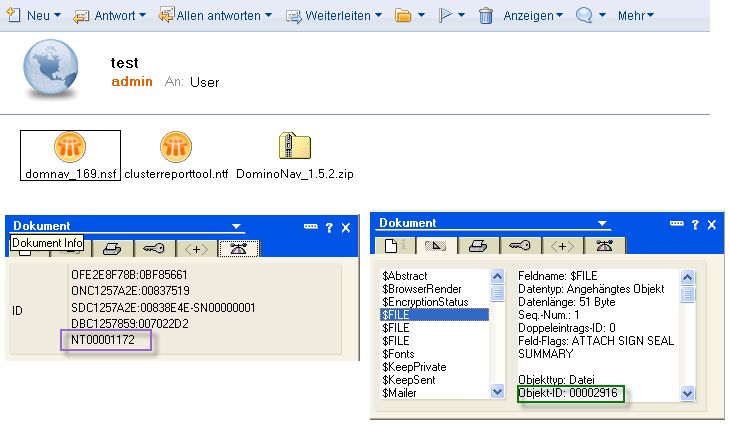
Exampel: 1 document + 3 attachments (1 NoteID+3 Object-ID)
benötigt wird die NoteID und Objekt-ID
required the NoteID and Object-ID
Tipp: @noteID
Schritt 2:
- notes.ini: DEBUG_DAOS_DIAGNOSTICS=1
anpassen Server notes.ini und Serverneustart
edit server notes.ini and restart server
oder/or
Console: set config DEBUG_DAOS_DIAGNOSTICS=1
(check: show config DEBUG_DAOS_DIAGNOSTICS)
- Console: tell daosmgr LISTNLO MAP -V mail\database.nsf

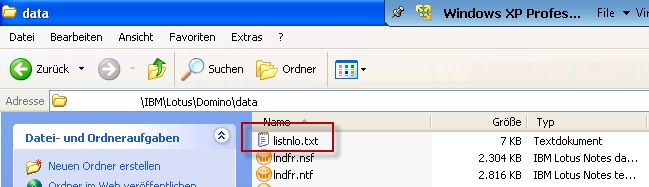
erzeugt …/Domino/Data die Datei listnlo.txt
created …/Domino/Data the File listnlo.txt
Schritt 3:
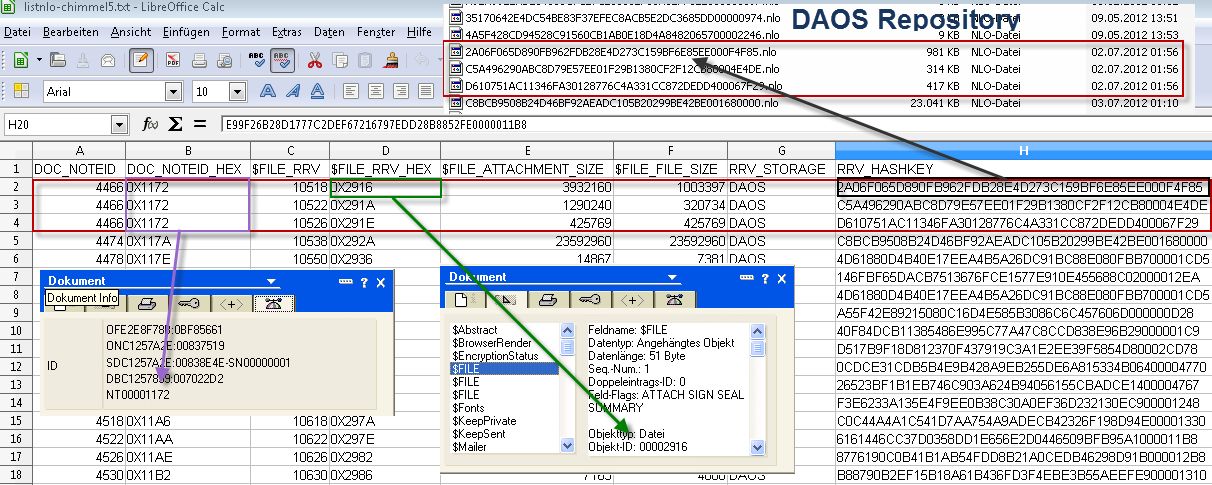
Datei listnlo.txt in Excel importieren (grosse Dateien in relationale DB)
import test file „listnlo.txt into Excel (import big File into relational database)
RRV-Haskey=filename in the DAOS Repository
Exampel: 1 NoteID und 3 Object-ID -> 3 RRV Hashkeys->3 .NLO Objekte
Vorsicht, es handelt sich um eine nicht dokumentierte Debugging Funktion!
Note that this is an undocumented feature! Ask the IBM Support!


Quellen:
IBM Support
update 10.09.2017

Man kann den Notes.ini-Parameter auch direkt von der Serverkonsole aus setzen. Das hat den Vorteil, das man den Server dazu nicht dauernd neu starten muss (hab’s getestet)!
set conf debug_daos_diagnostics=1
Danke für den Hinweis 🙂